In development · macOS · MIT
Your agents, on a board.
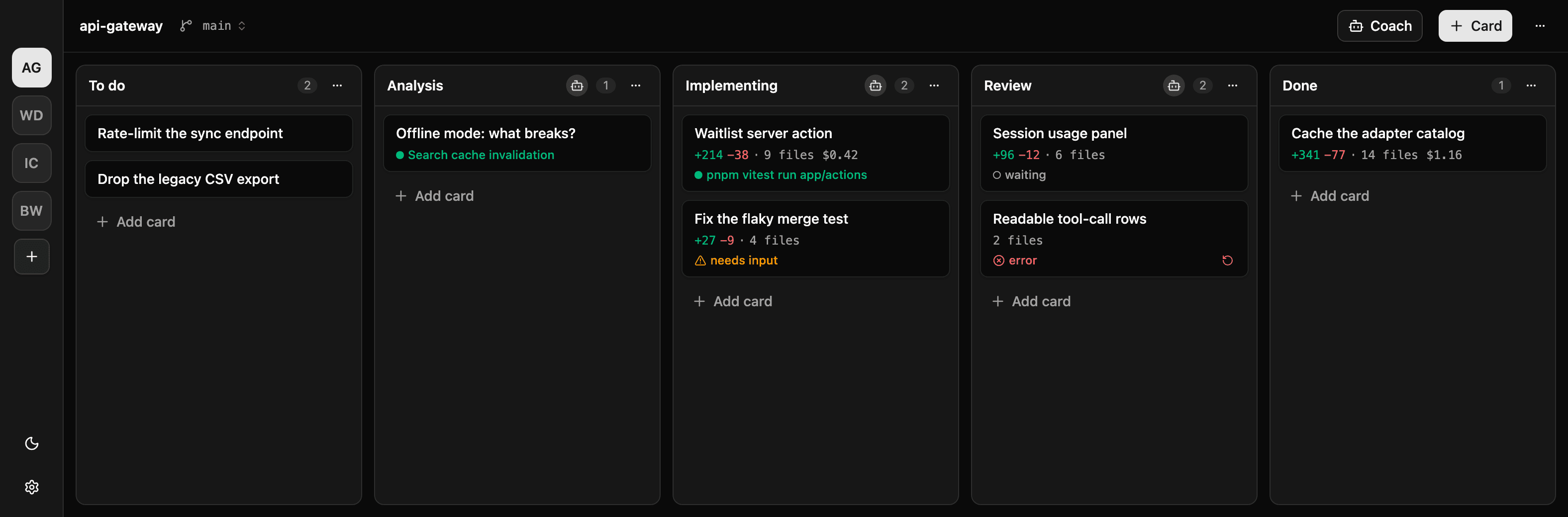
Design a workflow as columns, drop in cards, and let coding agents move the work through it — each on its own git worktree branch, running in parallel. Bring any agent that speaks ACP — Claude, Gemini, Codex, Copilot, Cursor — and nothing reaches your main branch until you merge it.
v0.2.0 · Aug 28, 2026 · 158 MB · Apple silicon
The build is not signed yet, so macOS calls it an unidentified developer: on first launch, right-click the app and choose Open.
How it works
A board, but the lanes do the work.
Three ideas hold the whole thing up. Nothing about the flow shape is hardcoded — each project draws its own columns.
- 01
Columns are stages
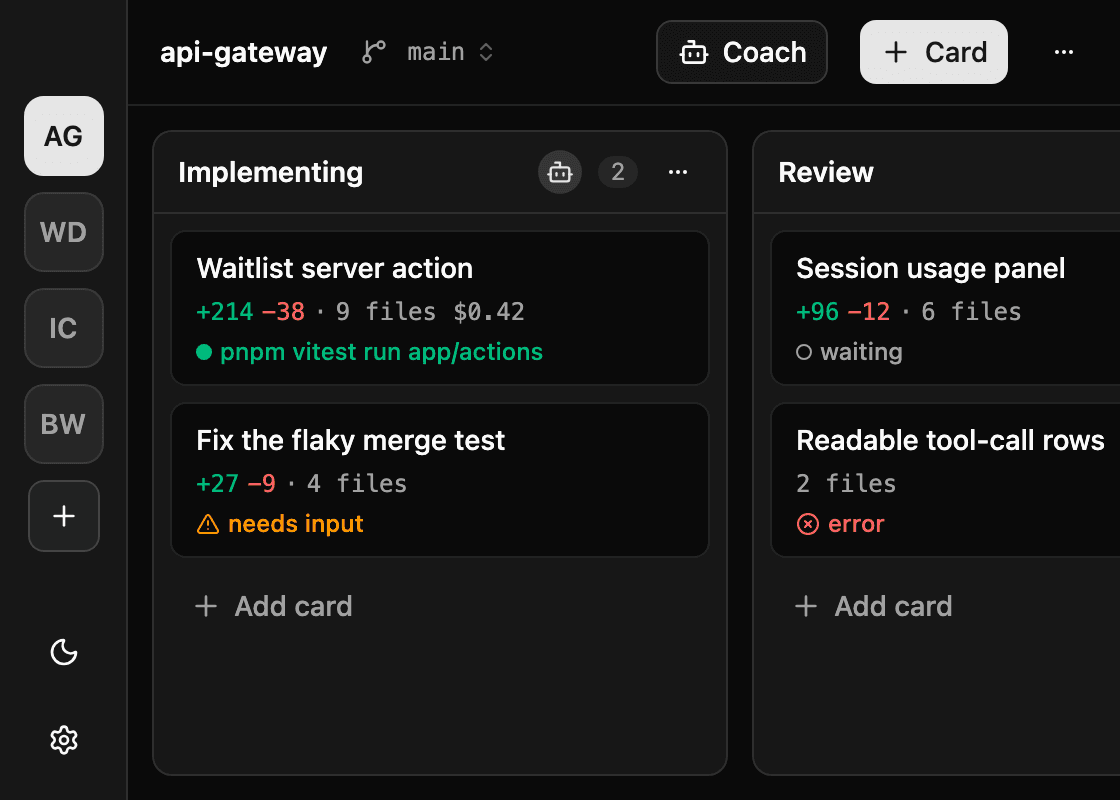
A board is whatever flow you draw: To do → Implementing → Done, or a full pipeline with Analysis, Review and QA. Any column can carry a Column Agent — an agent program, a model, and an instruction prompt. Columns without one stay inert: a backlog, a Done pile, a step you do yourself.
- 02
Cards enter, agents spawn
Moving a Card into an agent column starts a Session. Its entire context is the column instruction plus the card — description and comments — so a Review agent reads what the implementer wrote down, not the conversation it had. Agents hand off in comments and usually finish by moving the card on, which spawns the next stage.
- 03
Each card on its own branch
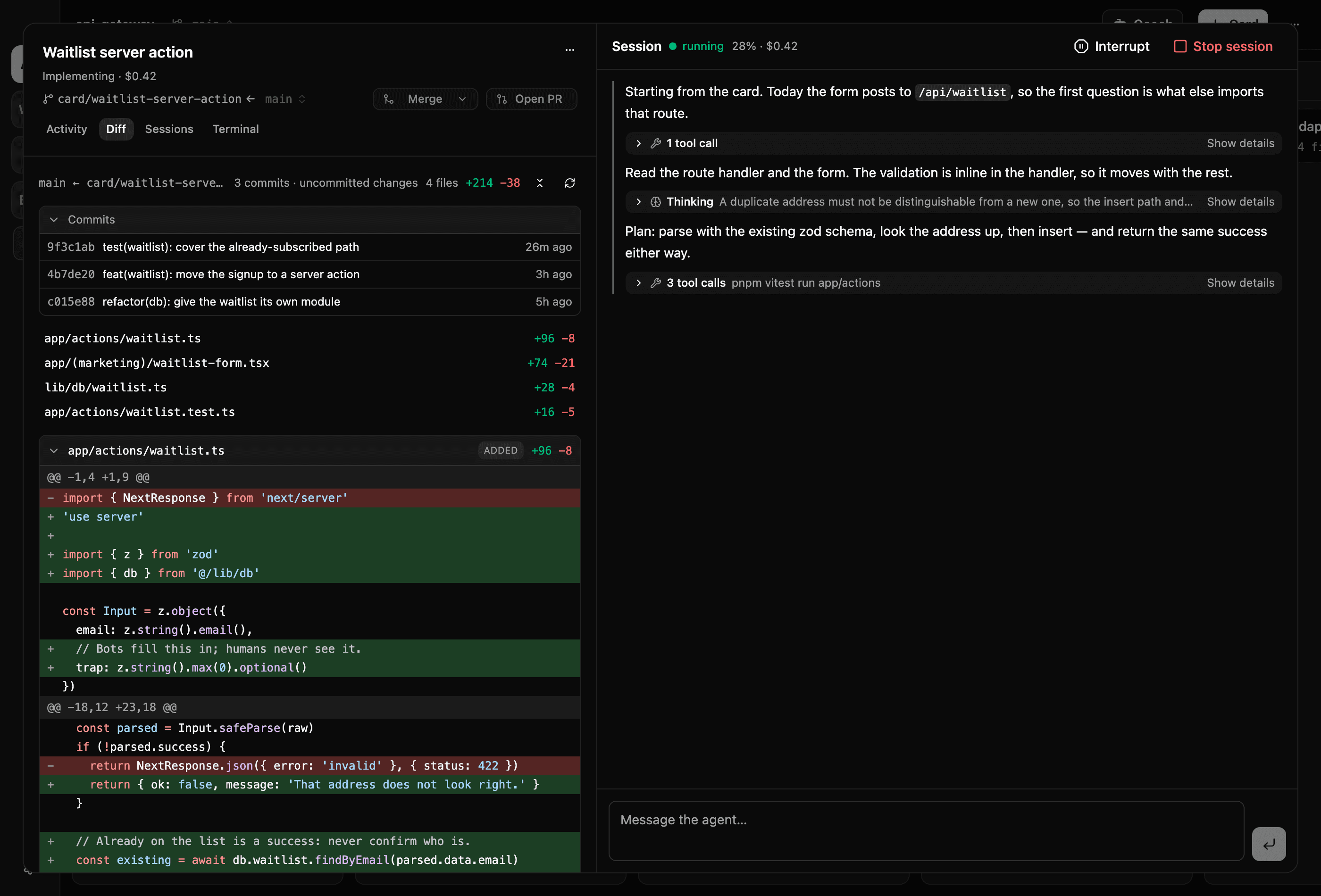
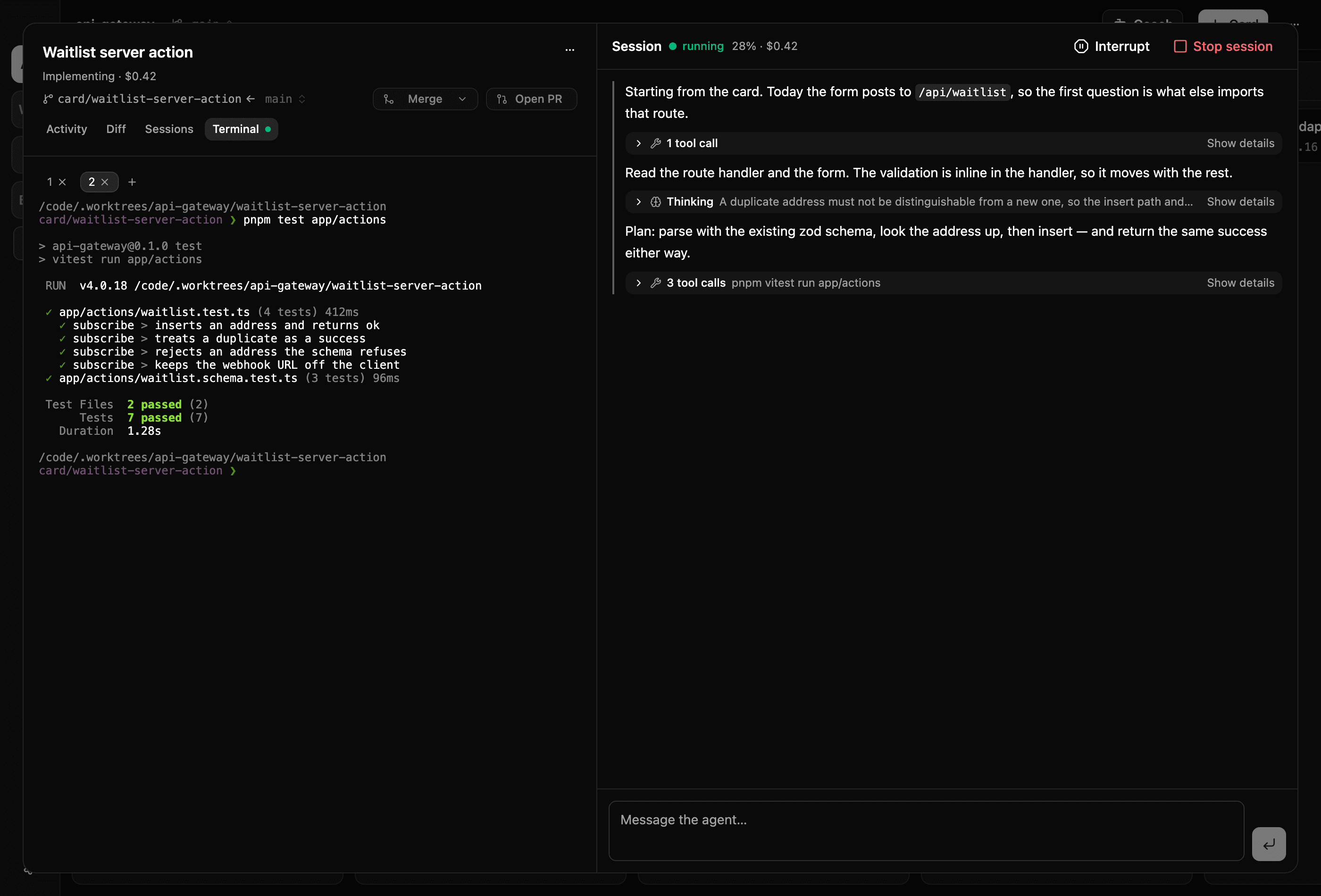
The first time a card meets an agent it gets a git Worktreeand a branch. All of that card's sessions work there, so ten cards run at once without touching each other. You read the diff and press merge — or open a pull request. Agents never do either.
Screens
Where the work actually happens.
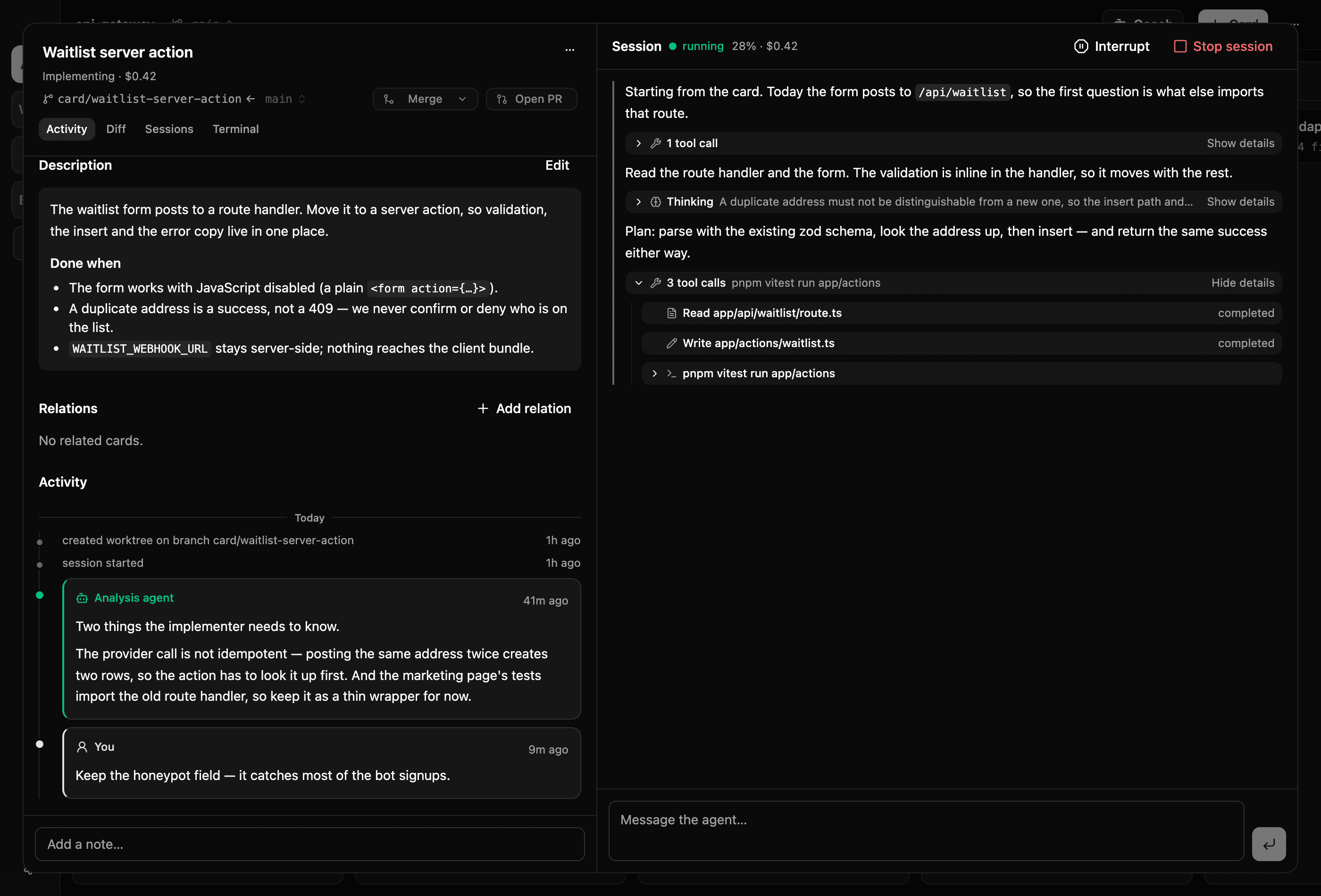
The board is the map. Everything you do to a piece of work — read the handoff, answer the agent, check the diff, land it — happens in one card panel.
Features
Built for running many agents without losing the thread.
One chat window gives you one agent and one branch. A board gives you the whole flow — and a place to stand while it runs.
Parallel agents, isolated worktrees
Every card gets its own git worktree and branch on first contact with an agent. Ten agents can be mid-edit at once and none of them can trample another — or your checkout.
Any agent that speaks ACP
Claude Code, Gemini CLI, Codex, GitHub Copilot and Cursor ship as adapters. Different columns can run different agents and models, so the cheap stage stays cheap.
You are the merge gate
Agents never touch the main branch. Landing a card is a diff view and a merge button in the card panel — or Open PR, which pushes the branch and files a pull request through gh.
A fresh session per column
No transcript crosses a column boundary. The card is the memory: agents write handoff comments, and the next stage starts clean instead of inheriting an earlier agent’s reasoning.
Live transcript, interject anytime
Watch messages and tool calls stream as they happen, and type into the same session mid-run to steer it — the way you would in a terminal, but for every card at once.
Needs Input, not dead ends
When an agent asks a question or wants permission, the card is badged Needs Input and waits. Answer in the card view and the same session picks up where it stopped.
A coach for the board itself
The Board Coach is an agile-coach chat that files, grooms and moves cards but never works one. It reads the repo to ground its suggestions and asks before it changes anything.
Local-first, all of it
Your machine, your repository, your keys. Agents run as local subprocesses against worktrees on your disk, and the board lives in a SQLite file next to them. There is no server.
Multi-provider
Pick the agent per column, not per lifetime.
The app talks to agents over the Agent Client Protocol. Any ACP-speaking binary can be an adapter; these five ship with it.
Claude Code
Anthropic subscription or API key
Gemini CLI
Google
Codex
OpenAI
Cursor
cursor-agent
GitHub Copilot
Copilot CLI
Board tools — move a card, comment, update the description, ask you a question — reach every adapter the same way: as an app-hosted MCP server registered when the session starts. Nothing is integrated per provider, so adding one is a row in a catalog rather than a feature.
FAQ
The questions worth answering up front.
Can I download it?
Yes — a macOS (Apple silicon) disk image, from the GitHub releases page. It is not signed or notarized yet, so macOS treats it as an unidentified developer: on first launch, right-click the app and choose Open. Windows and Linux builds are not done.
Where does my code go?
Nowhere. It is local-first: your machine, your repository, your keys. The app registers a local git repo, creates worktrees on your disk, and spawns the agent programs you already have installed as subprocesses. The board itself is a SQLite file. There is no backend to send anything to — whatever your chosen agent sends to its own provider is between you and them.
Can an agent break my main branch?
It cannot reach it. Every card works in its own worktree on its own branch; merging and opening pull requests are user actions in the UI. Permission requests inside a card's branch are auto-approved by default because the blast radius is that branch — and a column can opt into asking you instead.
What happens when a session fails?
The card stays exactly where it is with an error badge, a system comment holding the details, and a retry button that starts a fresh session on the same worktree. Failures never move cards — only you and agents do.
Do I need a specific AI subscription?
You need whichever agent CLI you want to drive, authenticated the way it normally is. The app does not resell tokens or hold credentials of its own; it launches the binary and speaks ACP to it.
Is it open source?
Yes, MIT licensed: github.com/petter/kanban-agent-interface. The releases are built from that repository by CI.